For administrators & detail coordinators
A clearer view of every detail.
Review requests, staffing, timesheets, invoices, and payment activity from the same administrative workspace. Here’s a look at the v4 interface on desktop and mobile.
See the administrator workflowStart with the current picture
See what needs attention.
The dashboard design brings active requests, unfilled details, pending timesheets, invoices, and scheduled officers into one overview, with shortcuts for common administrative tasks.


V4 design preview. Figures, clients, and event information shown are sample data.
Manage the roster
Keep detail activity in view.
Review events with their client, location, dates, hours, fulfillment, and payment status. The desktop design provides search, sorting, and filters to help administrators work through the detail list.


V4 design preview. Figures, clients, and event information shown are sample data.
Review one detail
Bring the event information together.
The detail drawer shows the event description, client, schedule, location, fulfillment, payment status, and contact information. Tabs organize the wider detail workflow, including staffing, scheduling, billing, and activity.

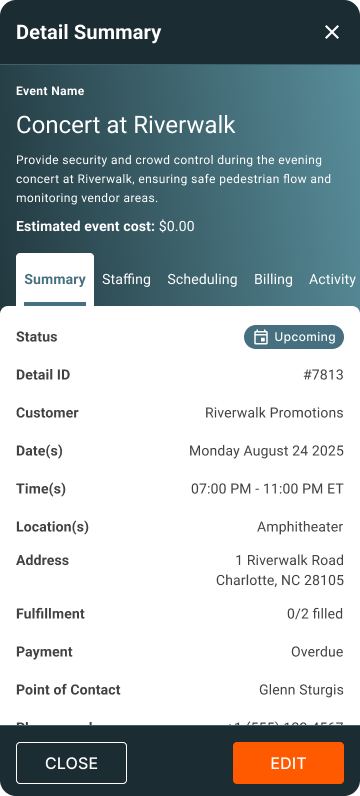
V4 design preview. Figures, clients, and event information shown are sample data.
Follow the financial picture
Review expected and received deposits.
The deposit-report design brings expected and received amounts, variance, overdue balances, collection rate, and processing time into one view. Use the report to support the conversation around collections and reconciliation.


V4 design preview. Figures, clients, and event information shown are sample data.
Desktop and mobile access
A consistent administrator experience.
The sign-in designs carry the same Off Duty Blue identity across desktop and mobile. The administrator screens shown here follow that visual system throughout the workflow.


V4 design preview. Figures, clients, and event information shown are sample data.
Explore the workflow